
How To Add Facebook Comments To Your WordPress Blog

If you’re reading this, chances are that you use social media and have a Facebook account. Did you know that Facebook is on track to have 1 billion users by August of this year? Crazy right?

Yes, and crazy good for your online business and getting more traffic to your website.
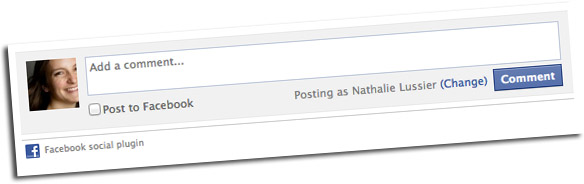
In today’s article and video training we’re going to look at how to add Facebook comments to your WordPress blog.

Here’s the how-to, and you can look for my recommendations after the video.

How To Add Facebook Comments To Your WordPress Blog
Why Add Facebook Comments to your Blog?

Now you might be wondering why you’d want to add Facebook comments to your blog, if you’re already using the default WordPress comments… and they’re working quite well, thank you very much.

Here’s why: by tapping into the social nature of Facebook, when someone comments on your site they have the ability to share their comment on their own Facebook account.

This means their friends will see it, and as people tend to hang out with similar people, their friends will likely come over and appreciate your site as much as the original commenter.

So in effect, you’re using Facebook to spread the word about your site, and to increase your web traffic.

Now you might be wondering why I recommend an SEO version of the Facebook comment plugin.

It’s not just because I’m a total SEO freak… I believe we should look at both the social and search engine side of everything we add to our websites.

Just like adding WordPress SEO plugins, I believe we should choose a Facebook comment plugin that will sync up your Facebook comments with your blog’s default commenting system.

This feeds the search engine all the latest comments from Facebook, and adds more content for you to be found under.

Time to test this, baby!

Leave a comment below – either Facebook or regular, and let me know what other techy stuff you might need help with, and I’ll add it to my list for free upcoming training videos.

Oh, and if you want to make the most of your website, don’t miss the Website Checkup Tool… It’s Free!

Grab your free website checkup

32 Responses to How To Add Facebook Comments To Your WordPress Blog

  1. Jean says:

    Great tip, Nathalie! Love it xo

  2. Jean says:

    Quick question, Nath. After I installed the plugin, configured, etc., I don’t see it on my homepage. Any ideas?

  3. Linda Eaves says:

    Done. Great tutorial see here: http://lindaeaves.com/2011/10/barge-queen/.

  4. Sukie Baxter says:

    Thanks, Nathalie! Totally something I'd meant to figure out but hadn't gotten to yet :-)

  5. Kristen Kalp says:

    Genius. :)

  6. Glad to be of service :)

  7. Hey Jean!

    You’ll only see the Facebook comment part on an individual blog post, not on the front page… but it looks like there’s something broken on your site, since your sidebar isn’t loading on individual blog posts… Do you have someone who can take a look at that for you?

  8. Thank you! Just installed the plugin it on my website, following your instructions!

  9. Thanks for this video, Natalie. I love these short, practical video tips. You do an excellent job of helping us to make our online presence more effective.

  10. Liz Longacre says:

    Installed! Thanks Nath!

  11. Eden Rudin says:

    Great video Nathalie Lussier!
    I didn't understand what you said at 3:10 and then continue to say, they seem to contradict each other.
    Is it for sure that if you were to lose your FB account that the comments would still be on your website, you 'own' them because they are part of your WordPress site?
    That is the only reason I haven't install one of these yet because I don't want to 'lose' all my comments if god forbid something happened to FB or my account ;-).

  12. Love this SEO Facebook tutorial! Nathalie, your video make everything so easy to understand!

  13. Hey Edin! Yes, so if you were to uninstall the Facebook comment plugin, your WordPress database would have a copy of all the comments. You can choose if you want them to appear on your blog or not. Right now I'm allowing them to appear, you can see the example here: http://nathalielussier.com/blog/social-media/add-facebook-comments-to-your-wordpress-blog

  14. Djanira says:

    Thanks Nathalie. this is a great video!

    Unfortunately I’m having the same problems as Jean. I installed the plugin, configured, etc., but I don’t see it on my blog posts…any ideas?
    They do appear on the sidebar…

  15. Nathalie Lussier says:

    Hey Djanira – hmm, did you just create your Facebook App? I’ve heard that sometimes it can take awhile for a new Facebook App to propagate…

    If you already had your app, try double checking your settings. I looked at the code on your site and it’s like the plugin isn’t activated, from my perspective.

  16. John Russell says:

    Check this out!

  17. VedaSun says:

    I love your videos Nathalie……so simple and you make techy stuff not seem so hard…….thank you!

  18. Eden Rudin says:

    Your awesome Nathalie, that makes it so much clearer!!

  19. Jean says:

    Thanks, Nath. Steph put me onto someone who can help!
    XO

  20. Purna Bhattacharya says:

    Hey Nath, great video, I was just looking into this. I'm wondering though, can my business FB page be linked to my site instead? I keep a personal account and business page on FB.

  21. JasjotBains says:

    Can we show BOTH Facebook and WP comments?

  22. This plugin works with your blog post directly not your personal or business FB pages. I think you're asking if you can comment as your business page instead, and I think you might be able to if you "switch to using your business page" in FB. I haven't tested it though!

  23. Nathalie Lussier says:

    Jasjot – yes you can :)

  24. Purna Bhattacharya says:

    I'll check it out, thanks!

  25. Lacy Boggs says:

    VERY cool. Thank you so much!

    On my site, there is a big space between the facebook comment and where the regular WP comments start. Any suggestions on how I can close that gap? Do you think it is in my theme CSS? http://laughinglemonpie.com/flavor-locality-humanity-and-nutrition/#more-1329

  26. Lex Vernon says:

    WordPress keeps logging me out after I enter the 3 pieces of information. When I log back in, I have to do it again and the same thing happens. Then, when I look at my blog, there's an error message saying that my ID isn't valid. Any thoughts?

  27. Raquel Wilson Sow says:

    Thanks for this tutorial Nathalie! I really enjoy the Facebook integration but unfortunately the plugin doesn't want to play happy with my Jetpack sharing tools plugin. I even tried the normal Digg Digg sharing buttons (I see you use the floating), but those don't work either. Any ideas on how to implement both FB comments and inline sharing buttons?

  28. Kim says:

    I Nathalie. Thanks for this, but I have a problem The FB account I want to use is only a Page Account. So when i log in as that user and try to go to Facebook.com/developers, it just keeps throwing me back to ask me which page I want to admin. I choose the business page and then try /developer again and go around in a circle. Help!

  29. Nathalie Lussier says:

    Hey Kim! You might need to start a new Facebook account that’s a “personal” account in order to access this capability. Good luck!

  30. Nat Nanton says:

    So glad I found this awesome resource today! I switched my Facebook commenting plugin to the one that you recommended.
    Two questions for you:
    1) How do you configure the plugin to NOT duplicate the Facebook comments in the regular commenting system?
    2) Does this plugin notify you whenever you get new comments? On Facebook?

    Thanks again for your great work, Nathalie!

  31. Nathalie Lussier says:

    Hey Nat!

    1. I think this is a setting in the plugin, check out the instructions page for more details. (You could also turn off regular settings)
    2. Not that I know of!

  32. Jill Beemer says:

    Love the video’s, keep them coming!

Leave a reply

Click For Your Free Website Checkup